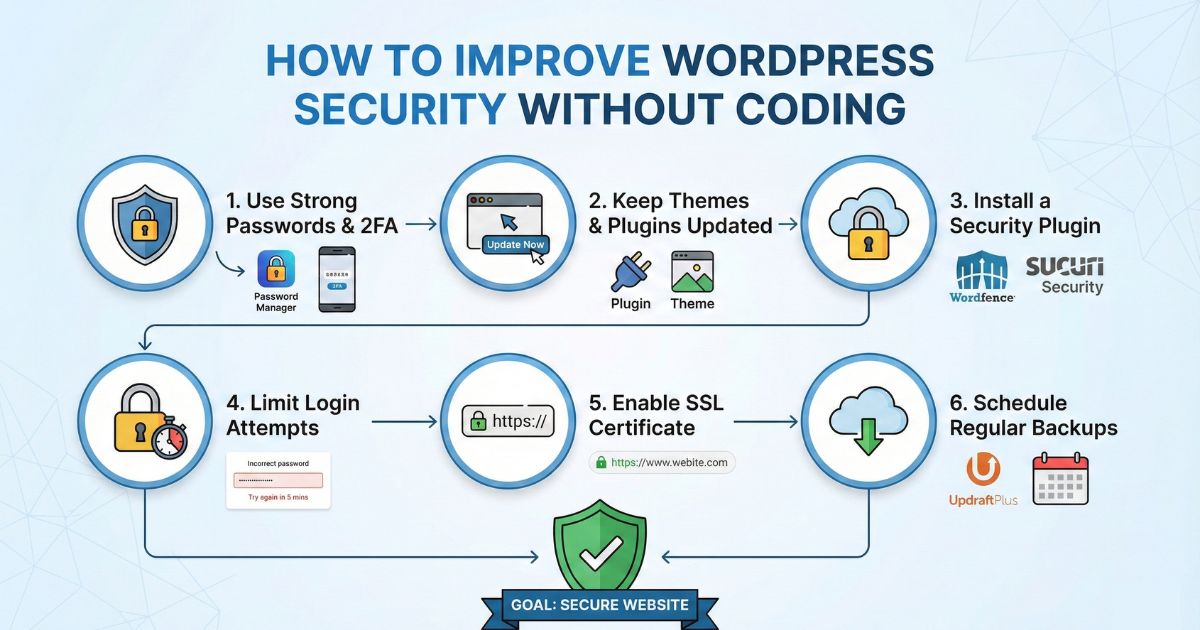
Keeping your WordPress site safe is not hard. You do not need coding skills. You only need simple steps and the proper habits. Small businesses and bloggers are common targets, so strong website protection is essential. In this guide, you will learn how to improve WordPress security in a way anyone can follow.
Why Security Matters for Every WordPress Site
Hackers do not care if your site is small or big. They attack sites that seem easy to break into. When a site gets hacked, you may lose data, lose customers, or face downtime. This can hurt your business and your reputation.
Good security stops most attacks before they start. You can do this with basic tools and simple habits.
Keep WordPress Updated
Updates are the easiest way to protect your site.
- Update WordPress core
- Update themes
- Update plugins
Updates fix known security issues. If you ignore updates, you leave doors open for hackers.
Simple tip
Turn on automatic updates for minor WordPress versions. You can also allow your hosting provider to manage updates for you.
Use Strong Passwords and Change Them Often
Weak passwords make hacking easy. A strong password is long and random.
Use passwords like:
- Random words mixed.
- A mix of letters and numbers
- No personal information
Do not use:
- Your name
- Your company name
- “admin123”
- Repeat passwords from other accounts
Tools like password managers can help create and store strong passwords.
Do Not Use “admin” as Your Username.
Many attacks start by guessing the username “admin.” If you use this username, you make the job easier for hackers.
Fix this:
- Create a new user with a unique username
- Give it Admin rights
- Delete the old “admin” user
This small step blocks many brute-force attacks.
Install a Security Plugin
You can improve WordPress security with a good security plugin. You do not need coding to set it up. Security plugins add features like:
- Firewall protection
- Malware scanning
- Login attempt limits
- File change alerts
Some plugins also block suspicious IP addresses. Others check your site for harmful scripts.
These tools act like a security guard for your website. You can turn features on and off with simple settings.
Limit Login Attempts
Hackers try to guess your password many times in a row. You can stop this by limiting login attempts.
Set a limit like:
- 3 attempts
- Then lock the account for a few minutes
This simple action slows down most brute-force attacks.
Use Two-Step Login (Two-Factor Authentication)
Two-factor authentication adds one more step to your login. After your password, you enter a code from your phone. Even if a hacker guesses your password, they cannot log in without that code.
This gives strong website protection without coding.
Use Secure Hosting
Good hosting improves security. Strong hosting providers:
- Monitor attacks
- Block harmful traffic
- Keep servers updated
- Offer SSL support
- Provide backups
If your hosting company cuts corners, your site becomes a target. A safe server reduces the risk from the start.
Add SSL to Your Website
SSL changes your site from “http” to “https.” It encrypts visitor data. It also makes your site look more trustworthy.
Most hosting companies offer free SSL. Please turn it on in your hosting control panel. Then force your site to use HTTPS in WordPress settings.
Remove Plugins and Themes You Do Not Use
Old or unused plugins can have security issues. Hackers scan for outdated tools.
Delete:
- Unused themes
- Old plugins
- Plugins you installed and forgot
Keep your site clean and simple.
Backup Your Website Regularly
Backups save your entire site. If something goes wrong, you can restore your site fast.
Set up automatic backups for:
- Database
- Files
- Media
Keep one backup stored off your server, like in Google Drive or Dropbox.
Regular backups reduce stress and help you recover fast from any attack.
Change the Login URL
By default, WordPress uses /wp-login.php or /wp-admin for login. Hackers know this.
You can change the login URL with a simple plugin. This does not require coding. It hides your login page from bots that scan the web for WordPress sites.
Scan Your Site for Malware
Security plugins offer malware scans. Run them often. A scan checks for:
- Suspicious files
- Unknown scripts
- Hidden redirects
- Modified core files
If a scan shows a warning, follow the suggested action or ask your host for help.
Protect Your File Permissions
File permission settings decide who can read or edit files on your server. Wrong settings can allow hackers to upload harmful files.
You do not need coding for this. Many security plugins help you set safe permission levels.
Avoid Free Themes from Unknown Sources
Many hacked sites come from pirated themes or plugins. They often include viruses.
Only download themes and plugins from:
- WordPress.org
- Trusted developers
- Official stores
This simple habit blocks a vast number of attacks.
Monitor Your Site Often
Check your website activity logs. Many security plugins show:
- Who logged in
- When they logged in
- What changes did they make
If you see unknown activity, act fast.
Conclusion
You can improve WordPress security without writing a single line of code. Use updates, strong passwords, security plugins, SSL, and backups. Follow these simple steps, and your site becomes much harder for hackers to attack.
Apply these steps today to protect your business, your content, and your customers.